Як працює кеш браузера і коли його очищати
Друге відкриття сайту зазвичай швидше за перше — і не тому, що мережа стала кращою. Браузер зберіг частину файлів із першого візиту й не запитує їх знову.

Оновлено:
Друге відкриття сайту зазвичай швидше за перше — і не тому, що мережа стала кращою. Браузер зберіг частину файлів із першого візиту й не запитує їх знову. Це кеш, і він одночасно є однією з найефективніших оптимізацій вебу й найчастішою причиною фрази підтримки «спробуйте очистити кеш». Ця стаття пояснює, що і як браузер кешує, які заголовки цим керують, чому інколи ви бачите стару версію сторінки, і як налаштувати кешування на своєму сайті так, щоб він був швидким і при цьому оновлювався миттєво.
Як браузер вирішує, що кешувати
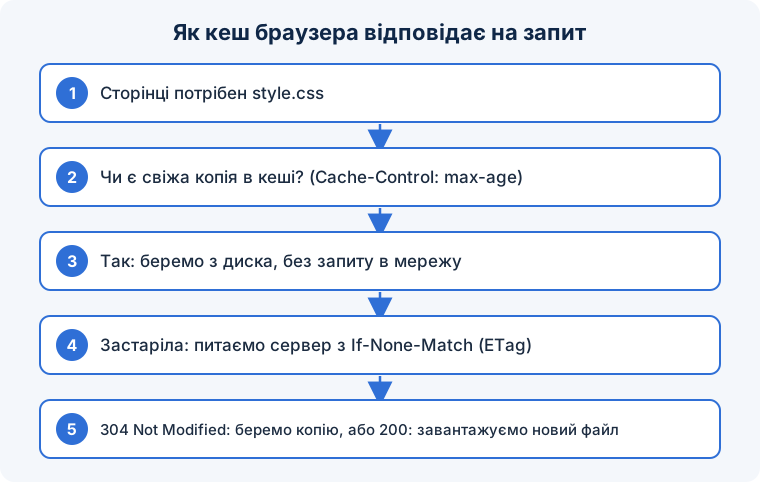
Коли браузер завантажує ресурс — сторінку, стиль, скрипт, картинку, шрифт, — сервер у відповіді може вказати, чи можна його зберегти й на скільки. Наступного разу, коли той самий ресурс потрібен, браузер дивиться в кеш:
- Свіжий (термін не минув) — береться з диска без жодного запиту до мережі. Нуль мілісекунд затримки.
- Застарілий (термін минув) — браузер робить умовний запит: «у мене є версія з таким ETag / від такої дати; змінилось?». Якщо сервер відповідає
304 Not Modified, використовується збережена копія, і передається лише кілька сотень байтів заголовків. Якщо змінилось — приходить200з новим вмістом. - Нема в кеші — звичайний запит.
Керують цим заголовки відповіді:
Cache-Control: public, max-age=31536000, immutable
Cache-Control: no-cache
Cache-Control: private, max-age=0, must-revalidate
ETag: "5d8c72a5edda8d6a"
Last-Modified: Tue, 15 Sep 2026 10:00:00 GMT
max-age — скільки секунд ресурс свіжий. no-cache означає не «не кешувати», а «завжди перевіряти перед використанням» (умовний запит). no-store — справді не зберігати (для конфіденційних даних). public/private — чи можуть проміжні кеші (CDN) зберігати ресурс. immutable — ніколи не перевіряти протягом терміну, навіть при оновленні сторінки.
Чому ви бачите стару версію
Класичний конфлікт: щоб сайт був швидким, статичні файли кешують надовго; але коли розробник змінює стиль, у відвідувачів на тиждень лишається стара копія, і сайт виглядає зламаним. Розв’язок — версіонування адрес: файл називають style.a1b2c3.css або додають ?ver=1.0.2, і при кожній зміні адреса змінюється. Стару адресу браузер може тримати рік — вона більше не використовується; нова адреса — новий запит. Так можна ставити max-age на рік для всіх статичних файлів і оновлювати їх миттєво. Саме це робить WordPress параметром ?ver=, і саме тому важливо змінювати версію при зміні файлу.
HTML-сторінки, навпаки, кешують коротко або з обов’язковою перевіркою: їхня адреса не змінюється, а вміст — так.
Інші рівні кешу
Кеш браузера — лише перший рівень. CDN (Cloudflare, Fastly) кешує відповіді на серверах по всьому світу й віддає їх ближче до користувача. Серверний кеш (плагіни кешування WordPress, Varnish, Redis) зберігає згенеровані сторінки, щоб не виконувати PHP і запити до бази для кожного відвідувача. Service Worker — скрипт у браузері з програмним контролем над кешем, який дає офлайн-режим. І DNS-кеш зберігає відповідність доменів адресам. «Очистити кеш» може означати будь-який із них; коли зміни не з’являються, перевіряйте всі рівні по черзі: браузер (жорстке оновлення Ctrl+Shift+R), плагін кешування, CDN.
Коли очищати кеш, а коли не варто
- Статичні файли (CSS, JS, зображення, шрифти) —
Cache-Control: public, max-age=31536000, immutableплюс версія в адресі. - HTML — короткий
max-ageабоno-cacheз ETag, щоб оновлення були видні одразу. - Особисті дані та сторінки після входу —
privateабоno-store. - Змінюючи файл, змінюйте його версію в адресі; інакше довгий кеш обернеться проти вас.
- Для перевірки використовуйте вкладку Network у DevTools: колонки Size («memory cache», «disk cache») і Status (304) показують, що працює.
- Користувачам: якщо сайт виглядає зламаним після оновлення — Ctrl+Shift+R; чистити весь кеш зазвичай не треба.
Часті запитання
Чому Lighthouse каже «використовуйте ефективні значення TTL кешу»?
Сервер віддає статичні файли без Cache-Control або з коротким терміном. Додайте довгий max-age для файлів із версією в адресі — у налаштуваннях сервера чи через .htaccess.
Чи кешуються сторінки з HTTPS?
Так, за тими самими правилами. TLS не забороняє кешування в браузері; для проміжних кешів потрібен public.
Скільки браузер зберігає кеш?
Доки не мине термін, не закінчиться місце (тоді витісняються найстарші), або користувач не очистить. Реально ресурси часто витісняються раніше за рік через обмежене місце на пристрої.
Найшвидший запит — той, якого не було; кеш робить це можливим, а версія в адресі — безпечним.
Коротко: браузер зберігає ресурси й повторно використовує їх без запиту, доки вони свіжі, а потім перевіряє умовним запитом; керують цим заголовки Cache-Control, ETag і Last-Modified. Кешуйте статичні файли на рік із версією в адресі, HTML — коротко, приватне — no-store, і пам’ятайте про інші рівні кешу (CDN, серверний, service worker), коли зміни не з’являються.