What is browser cache? How it works and when to clear it
The second visit to a website is usually much faster than the first, and the reason is the browser cache: a store of previously downloaded files that the…

Updated:
The second visit to a website is usually much faster than the first, and the reason is the browser cache: a store of previously downloaded files that the browser can reuse instead of fetching them again. The same mechanism explains a common frustration, the change you made to a site that does not appear until a hard refresh, and a common piece of advice, “clear your cache”. This article explains what is cached, how the browser decides whether a stored copy is still good, and how site owners control it.
How the browser decides what to cache
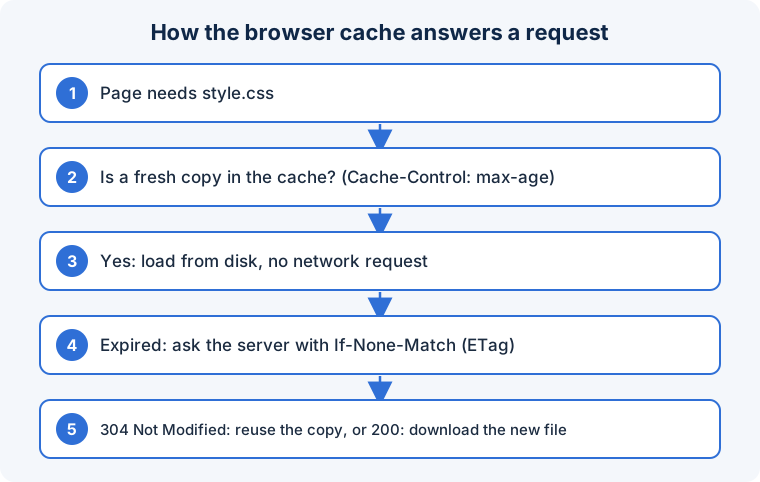
When the browser downloads a resource, it may store the response together with the headers the server sent. On a later request for the same URL it checks the stored copy and decides among three outcomes:
- Fresh: the copy is within its allowed lifetime. Use it immediately without contacting the server. This is the fastest path and costs zero network time.
- Stale but revalidatable: the lifetime has passed, but the browser can ask the server “has this changed since?” using a fingerprint (
ETag) or timestamp (Last-Modified). If the server answers304 Not Modified, the stored copy is reused; only a small header exchange occurred. - Not cacheable or absent: fetch it in full.
The server controls all of this through the Cache-Control header:
Cache-Control: public, max-age=31536000, immutable     # a versioned asset: keep for a year
Cache-Control: no-cache                                  # store, but always revalidate before use
Cache-Control: no-store                                  # never store (private data)
Cache-Control: max-age=0, must-revalidate                # effectively always check
Without any cache header, browsers apply heuristics, typically caching for a fraction of the time since the file was last modified, which produces unpredictable behaviour. Explicit headers are always better.
The versioning pattern
Long cache lifetimes and instant updates seem contradictory, and the standard solution is to change the URL when the content changes. Build tools give files names like app.3f9a1c.js containing a hash of the contents, or append a version query string such as style.css?ver=1.0.2. The HTML page, which is cached briefly or revalidated, references the new name; the new name has never been seen, so it is fetched; the old copy simply goes unused. Assets can then be cached for a year with immutable, and updates still appear on the next page load. This is why “the CSS did not update” almost always means the version string was not bumped, and why the fix is not to shorten cache times but to version properly.
Other caches in the chain
The browser’s HTTP cache is one of several. A service worker can intercept requests and serve from its own cache, which is how progressive web apps work offline; it is also a common source of “stuck” content because its logic is under the site’s control. Content delivery networks and reverse proxies cache responses near users and obey the same headers, plus their own rules. DNS caching stores name lookups. Each layer can hold an older copy, so a change that has not appeared may be waiting in any of them.
What clearing the cache does
A normal reload revalidates the main page and uses cached assets if fresh. A hard reload (Ctrl+Shift+R, or Cmd+Shift+R) bypasses the cache for the page and its resources. “Clear browsing data” deletes stored copies, forcing everything to download again. It fixes problems caused by stale or corrupted stored files and nothing else; it does not speed up a slow connection, remove malware or fix server errors, and it logs you out of sites if cookies are included in the selection.
When to clear the cache and when not to
- For site owners: give versioned static assets a long
max-agewithimmutable, and change the version on every deploy. Give HTML a short lifetime orno-cacheso it is revalidated. - Mark personal or sensitive responses
no-storeso they are never written to disk. - Send
ETagorLast-Modifiedso revalidation is cheap. - For readers: try a hard reload before clearing the cache; try a private window to rule out extensions and service workers.
- If a site’s change is invisible only to you, it is a cache; if invisible to everyone, it is the server or a CDN.
Frequently asked questions
Does the cache use a lot of disk space?
Browsers cap it, typically at a few hundred megabytes to a few gigabytes, and evict the least recently used entries automatically. It rarely needs manual management.
Why does a page load fast on one device and slowly on another?
The first device has the assets cached; the second is downloading them. Measure first-visit performance in a private window to see what new users experience.
Can caching leak private data?
On a shared computer, yes: cached pages and images remain on disk. Responses containing personal data should be sent with no-store, and shared machines should use private windows.
Caching is a promise from the server about how long a file stays true; versioned URLs let that promise be long without ever being wrong.
In short: The browser reuses downloaded files according to Cache-Control rules, revalidating with ETag when lifetimes expire. Versioned asset URLs with long lifetimes give both speed and instant updates. Clearing the cache only helps when a stored copy is stale or corrupted, and a hard reload usually suffices.