What is an API? How API access works, with examples
An API is an agreed way for one program to request data or an action from another. It defines endpoints, inputs, outputs, authentication and error behaviour.

Updated:
An API is an agreed way for one program to request data or an action from another. It defines endpoints, inputs, outputs, authentication and error behaviour. A mobile app, for example, may use an API to retrieve account information from a server, and a website may call a payment provider’s API to charge a card. The term appears in job adverts, product pages and privacy debates, so it helps to know what an API actually is and what it is not.
Requests, endpoints and responses
The letters stand for application programming interface. The important word is interface: an API is a boundary with rules, not a piece of hardware or a particular technology. On one side sits a program that wants something; on the other sits a program that provides it. The API describes exactly how the request must look and exactly what will come back.
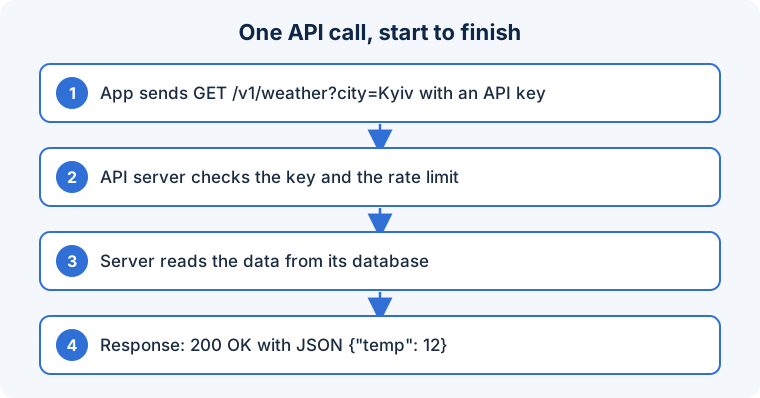
For web APIs, the most common kind today, a request is usually an HTTP call to a URL such as https://api.example.com/v1/orders/123. The request carries a method (GET to read, POST to create, and so on), headers that identify the caller, and sometimes a body with data in JSON format. The response has a status code (200 for success, 404 for “not found”, 401 for “not authenticated”) and its own JSON body. Because both sides agree on this shape, a Python script, a mobile app and a smart speaker can all use the same API without knowing anything about each other’s internals.
A good API definition covers more than the happy path:
- Authentication: how a caller proves who it is, typically with an API key, a token or a signed request.
- Authorisation: what that caller is allowed to do. A key that can read orders should not automatically be able to refund them.
- Rate limits: how many requests are allowed per minute, and what happens when the limit is exceeded.
- Errors: predictable codes and messages so a client can distinguish “you sent bad data” from “we are temporarily down”.
- Versioning: how changes are introduced without breaking existing clients, often through a version number in the URL.
Everyday examples
When a weather widget shows the forecast, it is calling a weather service’s API. When you log in to a site with your Google or Apple account, the site talks to an identity API. When an online shop shows a delivery estimate, it has asked a courier’s API. Inside a single company, APIs let the mobile team and the web team build on the same back end. Even your phone exposes APIs: the operating system’s camera or location API is what an app calls when it asks for permission.
Not every API is on the web. Programming languages have library APIs, operating systems have system APIs, and hardware has driver APIs. The idea is identical: a documented contract that hides the details behind it.
Where APIs go wrong
Because APIs are designed for machines, mistakes tend to be silent and scalable.
- Secrets in the wrong place. An API key embedded in a web page’s JavaScript or a mobile app can be extracted by anyone and reused, running up bills or leaking data. Secrets belong on a server the developer controls.
- Confusing a key with an identity. An API key identifies an application, not a user. Systems that treat “has a valid key” as “is this customer” end up exposing one user’s data to another.
- Trusting input. An API must validate everything it receives. Assuming callers are well-behaved is how injection attacks and corrupted data happen.
- Ignoring failure. Networks time out and providers have outages. A client that does not handle a slow or failed response can freeze an app or, worse, retry a payment ten times.
- Logging too much. Recording full requests for debugging can quietly store passwords, tokens and personal data in log files.
Getting started with your first API
- Read the provider’s documentation on authentication, rate limits and pricing before writing code; surprises here are expensive.
- Keep API keys server-side, restrict what each key can do, and rotate a key immediately if it appears anywhere public.
- Design clients to expect failure: use timeouts, retry only idempotent operations, and show the user a meaningful message.
- Log outcomes and error codes, never credentials or full personal records.
- Pin to a specific API version and subscribe to the provider’s change announcements so upgrades are planned, not discovered.
Frequently asked questions
Is an API the same as a website?
No. A website returns pages for people to read; an API returns structured data for programs to process. Many services offer both, often on different domains.
What does “REST” mean?
REST is a common style for web APIs that uses ordinary HTTP methods and URLs to represent resources. Alternatives include GraphQL and gRPC; the choice affects developers more than end users.
Why do apps ask for so many permissions?
Each permission corresponds to an operating system API the app wants to call. Asking for more than the feature needs is a sign of careless design or of data collection you may not want.
An API is a contract between software; its reliability depends on both the contract and the implementation.
In short: An API is a documented agreement that lets programs talk to each other. Understanding the contract, protecting the credentials and planning for failure matter more than any particular technology behind it.