How DNS works when you open a website
Computers find each other by IP address, but people remember names. The Domain Name System is the distributed directory that turns versuss.space into an address a network can…

Updated:
Computers find each other by IP address, but people remember names. The Domain Name System is the distributed directory that turns versuss.space into an address a network can route to. It runs before every web request, email delivery and app connection, usually in a few milliseconds, and it is invisible until it breaks, at which point “the internet is down” even though every cable and router is working. This article explains how a name becomes an address, why changes take time to spread, and what the various record types and settings you meet in a domain control panel actually do.
Resolvers, root servers and the lookup chain
DNS is a hierarchy read right to left. The trailing, usually invisible, dot is the root. To its left is the top-level domain (.space, .com, .ua), then the registered domain (versuss), then any subdomains (www, mail). Each level is run by a different organisation, and each knows only who is responsible for the level below.
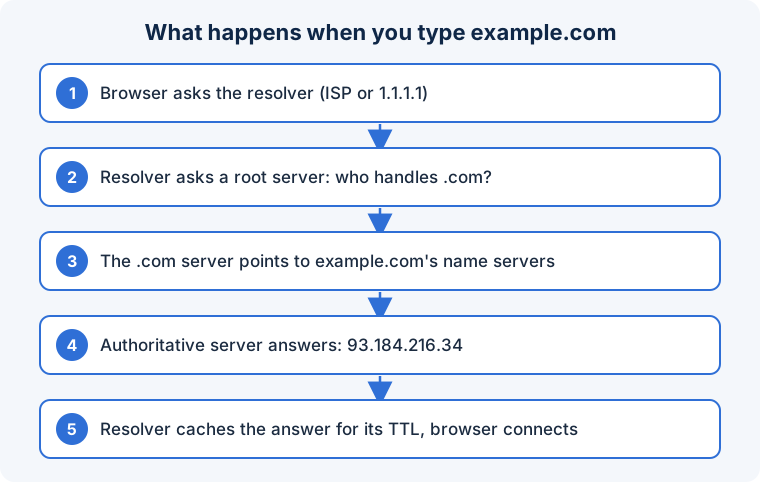
When you type a name, your device asks a recursive resolver, typically run by your internet provider, your router, or a public service such as 1.1.1.1 or 8.8.8.8. If the resolver has the answer cached, it replies immediately. Otherwise it walks the hierarchy:
- It asks a root server, “who handles
.space?” and receives the addresses of the.spaceTLD servers. - It asks a TLD server, “who handles
versuss.space?” and receives the domain’s authoritative name servers, the ones the owner configured at the registrar. - It asks an authoritative server for the record and receives the answer, along with a TTL (time to live) saying how many seconds it may be cached.
The resolver caches the result and returns it. Your operating system and browser cache it too. The next lookup for the same name, from anyone using that resolver, is answered from cache until the TTL expires.
Record types you will meet
- A and AAAA: the IPv4 and IPv6 addresses for a name. The records that make a website reachable.
- CNAME: an alias saying “this name is the same as that name”. Commonly
wwwpointing at the bare domain or at a hosting provider’s hostname. A name with a CNAME may have no other records. - MX: the mail servers that accept email for the domain, with priorities.
- TXT: free-form text used for verification (proving domain ownership to Google, AdSense, certificate authorities) and for email authentication policies: SPF (which servers may send mail for the domain), DKIM (public keys for signed mail) and DMARC (what receivers should do with failures).
- NS: the authoritative name servers for the domain or a subdomain.
- SRV and CAA: service locations and permitted certificate authorities, respectively; less common but useful.
Why changes take time
When you change a record, the authoritative server answers with the new value immediately. But every resolver that cached the old value keeps serving it until its TTL runs out, and some ignore TTLs and cache longer. “Propagation” is therefore not the change spreading outward; it is old caches expiring at different times around the world. Lowering the TTL to a few minutes a day before a planned change, then raising it afterwards, makes migrations nearly instant. Changing name servers at the registrar is slower, because the TLD’s own records typically have TTLs of a day or two.
Security and privacy
Classic DNS travels in plain text over UDP, so anyone on the path can see which names you look up and, in principle, forge answers. DNSSEC lets authoritative servers sign records so resolvers can detect forgery. DNS over HTTPS (DoH) and DNS over TLS (DoT) encrypt the conversation between your device and the resolver, hiding lookups from the local network; modern browsers and operating systems support them. Choosing a resolver is a trust decision: it sees every domain you visit. Malicious software commonly changes a device’s DNS settings to redirect traffic, which is why “check your DNS settings” is standard troubleshooting.
Fixing common DNS problems
- When a site is unreachable but others work, test DNS first:
nslookupordigthe name, and try another resolver. - Before moving a site or mail server, lower the affected records’ TTL a day in advance.
- Set SPF, DKIM and DMARC for any domain that sends email, or messages will land in spam.
- Use a resolver you trust and enable encrypted DNS on devices that leave the house.
- Keep your registrar account behind two-factor authentication; whoever controls DNS controls the domain, email and certificates.
- Do not point a CNAME at the bare domain apex; use A/AAAA or your provider’s ALIAS/ANAME feature.
Frequently asked questions
Why does the site work for me but not for a friend?
Your resolver has the new record; theirs still caches the old one. Wait for the TTL, or have them flush their DNS cache and try a different resolver.
What does “server IP address could not be found” mean?
The resolver returned no address: the domain is misspelt, expired, has no A/AAAA record, or the resolver itself is unreachable.
Is changing my DNS server safe?
Yes, if you choose a reputable public resolver. It can improve speed and privacy and enable malware or content filtering. Avoid random or unknown resolvers; they see everything you look up.
DNS is a chain of “ask the next one down” with caching at every link; that caching is why it is fast and why changes seem slow.
In short: DNS resolves names to addresses by walking from root to TLD to authoritative servers, caching each answer for its TTL. Record types map names to addresses, aliases, mail servers and verification text. Changes appear as caches expire, so lower TTLs before migrations, secure your registrar account, and treat your resolver as something that sees every site you visit.